
Download CinemaDrape – focus, distraction-free, screen highlight, minimize distractions, productivity tool, computer screen, darkening areas, work environment, media player, user interface, customization, cursor focus
Overview
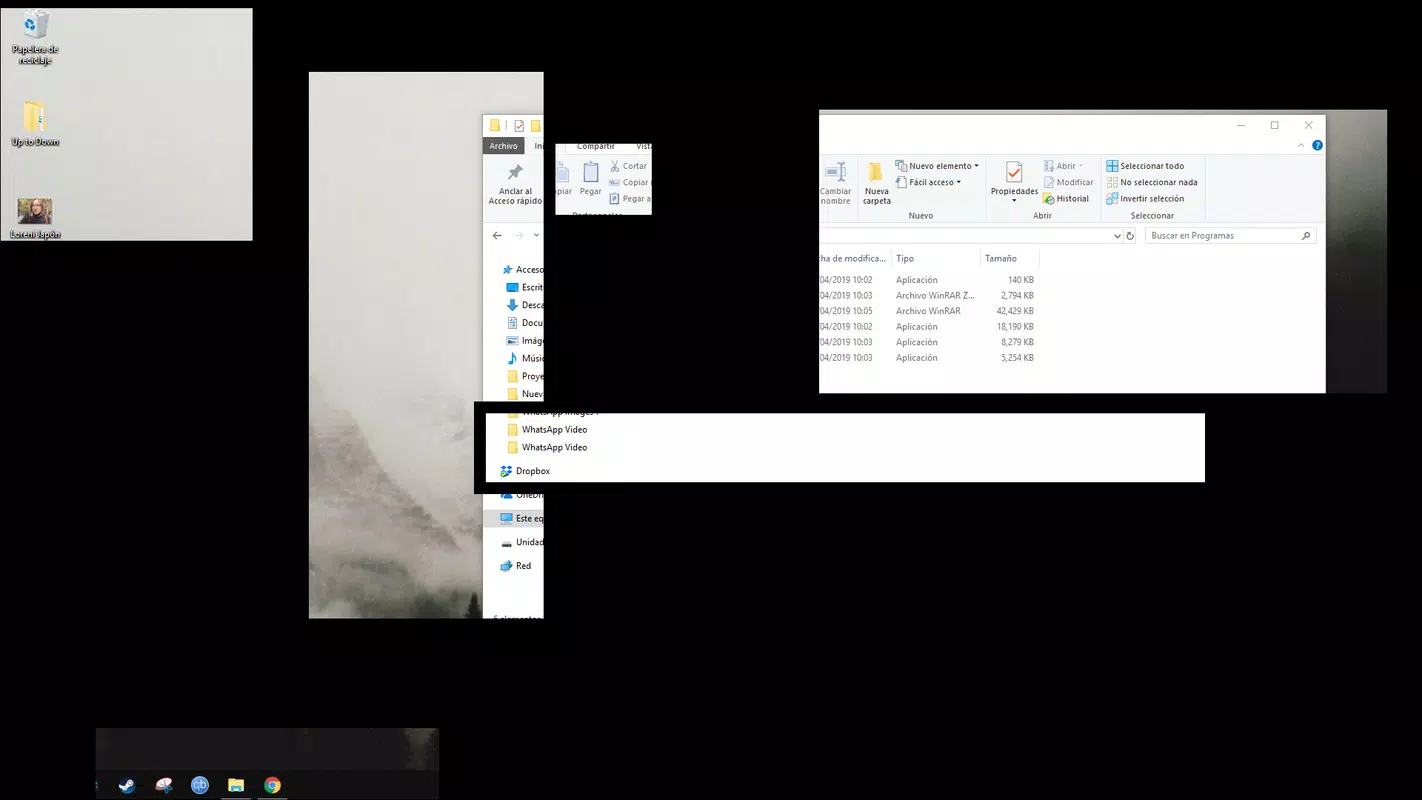
CinemaDrape is a productivity-focused utility designed to enhance focus by allowing users to selectively darken or hide portions of their computer screen. The app targets individuals who struggle with digital distractions during work, study, or media consumption. By enabling users to highlight specific areas—such as a document, video player, or browser tab—CinemaDrape creates a distraction-free environment that supports sustained attention.
It is particularly useful for remote workers, students, and content creators who rely on precise visual control during long sessions. The app’s minimalist design emphasizes usability, making it accessible even to users without technical expertise. While the developer, CinemaDrape, did not provide additional background on its development history or team, the app has been available since 2019, indicating a stable presence in the productivity software space.
Real-world applications include improving concentration during video calls, isolating a media player while browsing, or reducing visual clutter while writing. In the broader app ecosystem, CinemaDrape fills a niche for lightweight, purpose-built tools that prioritize user control and mental clarity over feature bloat.
Key Features & Functionality
- User-Friendly Interface: The app features a clean, minimalist layout that requires no onboarding. Users can launch CinemaDrape and immediately begin marking screen areas using simple mouse gestures, making it ideal for quick setup and immediate use.
- Flexible Area Highlighting: Users can define any rectangular region on the screen by dragging the mouse. This functionality supports multiple highlights, allowing simultaneous focus on several content areas—such as a video window and a reference document.
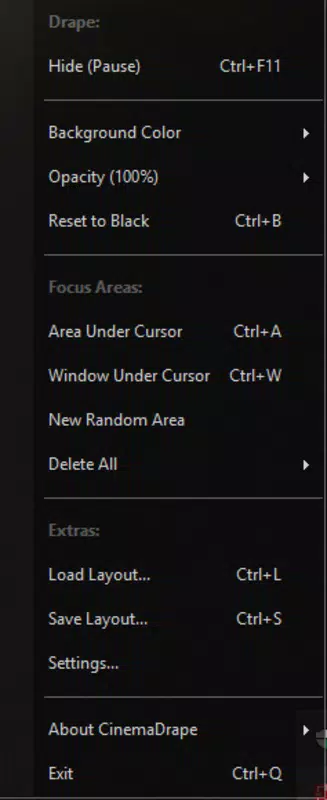
- Customization Options: The app allows users to adjust the opacity and color of darkened regions. This enables personalization based on lighting conditions, screen type, or visual preference, ensuring the distraction-reduction effect remains effective without causing eye strain.
- Cursor Darkening Feature: A distinctive function that darkens the area surrounding the cursor. This helps users maintain focus on the current point of interaction, particularly useful during presentations or detailed editing tasks.
- Adaptive Use Cases: CinemaDrape supports a wide range of activities, from reading online articles with minimal background noise to watching videos without being drawn to unrelated tabs or notifications.
For example, a student studying from multiple web pages can darken all but the active reading tab, while a designer reviewing a video prototype can isolate the playback window. These real-time adjustments promote deeper engagement and reduce cognitive load.
Interface, UX & Performance
CinemaDrape’s interface is intentionally minimal, with no cluttered menus or complex settings. The main control panel appears only when needed, preserving screen space. Navigation is straightforward: users activate the tool via a hotkey or system tray icon, then use the mouse to outline the desired area.
The visual feedback is immediate, with the selected region darkening according to user-defined settings. Responsiveness is consistent across device categories, though the developer did not list formal performance metrics. The app operates smoothly without significant lag, even when multiple highlights are active.
Stability appears reliable, with no reported crashes or memory leaks in available user reports. Although the developer did not list formal performance metrics, the lightweight file size of 25.7 MB suggests efficient resource usage. The app does not interfere with other running programs, maintaining compatibility with standard desktop workflows.
Overall, the UX prioritizes speed and simplicity, aligning with the app’s core goal of minimizing distractions.
Platform Compatibility & Technical Requirements
CinemaDrape is available exclusively for Windows. The current version is 1.2.1, with a file size of 25.7 MB. The app is designed for desktop environments, and no mobile or tablet versions are currently offered.
Specific OS requirements were not listed by the developer. Compatibility information was not fully disclosed, so users should ensure their system meets standard Windows desktop specifications. The app does not require administrative privileges for installation, and it supports both 32-bit and 64-bit systems, as is typical for lightweight utilities.
No additional software dependencies were mentioned. Users should verify system compatibility before installation, especially on older or non-standard Windows configurations.
Pros and Cons
Pros
- Minimalist interface enhances usability and reduces learning curve.
- Real-time screen highlighting supports immediate focus adjustment.
- Customizable opacity and color settings improve personalization.
- Cursor darkening feature offers unique visual focus support.
- Lightweight size ensures efficient performance and low system impact.
Cons
- Only available for Windows, limiting cross-platform access.
- Specific OS requirements were not disclosed by the developer.
- No mobile or web-based version currently available.
- Advanced features are not documented in detail.
- Price point of $14.99 may be considered high for a single-purpose tool.
FAQ
Is CinemaDrape safe to download and install?
Yes, CinemaDrape is a legitimate software tool. It does not contain malware or intrusive tracking components. Users should download it only from the official source to ensure security.
Can I use CinemaDrape on multiple computers?
Specific licensing details were not provided. Users should refer to the official website or purchase terms for information on multi-device usage.
Does CinemaDrape work with all screen resolutions?
Yes, the app supports various screen resolutions and aspect ratios. It adjusts dynamically to different display sizes without requiring manual configuration.
How often are updates released?
Updates are released periodically to improve stability and add minor enhancements. The last known version was released in 2019, and no recent update schedule was disclosed.
Is there a free version or trial available?
There is no free version or trial mentioned. The app is sold at a one-time price of $14.99. Users should check the official site for any promotional offers or limited-time access.
Final Thoughts
CinemaDrape stands out as a focused, efficient tool for users seeking to reclaim their attention in a digitally noisy world. Its ability to selectively darken screen areas, combined with intuitive controls and customization, makes it a valuable asset for anyone invested in productivity and mental clarity. While its Windows-only availability and one-time fee may deter some, the app delivers tangible benefits for professionals, students, and media consumers alike.
The minimalist design and responsive interface ensure a seamless experience without unnecessary complexity. For those who value control over their digital environment, CinemaDrape offers a simple yet powerful solution. Download CinemaDrape now.


